The 6-phase deal backbone & smart due dates
A great Playbook isn't just a pile of tasks — it has a structure that mirrors how a deal actually moves. Give every template the same backbone and any file becomes readable at a glance.
The 6 phases
Group every task into one of six phases, in order:
Intake → Under Contract → Financing → Due Diligence → Pre-Closing → Post-Close
| Phase | What lives here |
|---|---|
| Intake | Open the file, confirm parties, collect the executed contract, set up the deal |
| Under Contract | Introductions, send executed docs, open escrow/title |
| Financing | Loan application status, appraisal ordering & scheduling |
| Due Diligence | Inspection scheduling, repair negotiation, contingency tracking |
| Pre-Closing | The heavy phase — title, HOA/estoppel, walk-through, closing disclosure, scheduling the closing |
| Post-Close | Deliver documents, request a review, close out the file |
In a real workload, Pre-Closing is consistently the heaviest phase — it's where the most balls get dropped. Front-load detail there.
A full buyer or seller file typically lands around 10 milestones and 45–50 tasks. A listing file is lighter — about 7 milestones and 25 tasks. Don't force the full buy-side structure onto a listing.
Smart due dates: anchor to key dates, don't hand-type them
This is the feature that saves the most time. Instead of typing a calendar date on each task, set a due-date offset anchored to a key date:
"3 days after the Inspection Deadline"
"1 day before Closing"
When DocJacket extracts the contract's key dates, every anchored task schedules itself automatically. Change a date (an extension, a delay) and the whole schedule shifts with it. You never rebuild a calendar by hand.
To set an anchored due date on a template task:
- Open the task in the template.
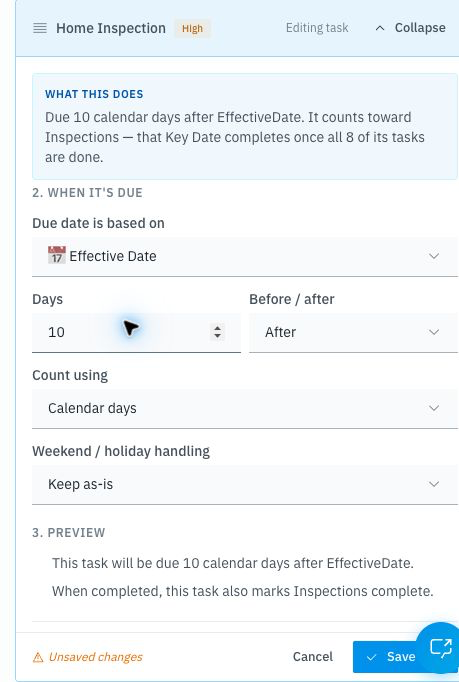
- Under Due date, choose Relative to a key date.
- Pick the key date (Inspection Deadline, Financing Deadline, Closing, and so on), the number of days, and before/after.
The number of days for inspection, financing, and appraisal periods come from your state's contract and your local practice — they're not the same everywhere. The 6-phase structure is universal; the day-counts are yours to set. Set them once per template and every file inherits them.