Role-based recipients & CC yourself
A template is only reusable if it knows who to send to without you retyping addresses every time. The trick: address by role, not by person.
Address by role, not by email
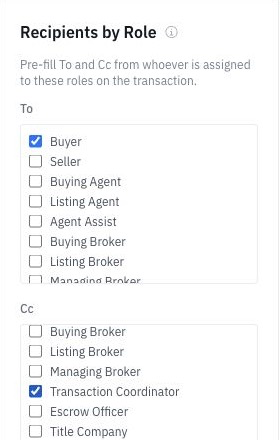
When you build an email template, set the recipients as roles — Buyer, Seller, Listing Agent, Buying Agent, Escrow Officer, Title Company, Loan Officer, Wholesaler. On each deal, DocJacket resolves those roles to the actual contacts on that file.
So "Intro to Listing Agent" always goes to this deal's listing agent — no lookups, no copy-paste, no wrong-recipient mistakes.
Example wiring from real templates:
| To (roles) | CC (roles) | |
|---|---|---|
| DA to Title Company | Escrow Officer, Title Company, Title Processor | Buying Agent, Transaction Coordinator |
| Inspection Scheduled | Buyer | Buying Agent, Transaction Coordinator |
| Intro to Listing Agent | Listing Agent | Buying Agent, Transaction Coordinator |
Always CC yourself
Notice the TC is CC'd on every template above. Do this on all of yours.
Every message you send becomes part of a complete, searchable paper trail — in your own inbox and on the deal — with zero extra effort. When a question comes up weeks later ("did we ever send the DA?"), the answer is one search away. Professional CYA, automated.
Build sophisticated To/CC combinations
You can mix roles for the right etiquette on each message. Real examples:
- To: Seller · CC: Transaction Coordinator, Listing Agent
- To: Buyer · CC: Transaction Coordinator, Buying Agent
- To: Wholesaler · CC: Transaction Coordinator
This keeps the right people looped in without anyone being surprised to be on (or off) a thread.
Set recipients on a template
- Open the email template at Templates > Email Templates.
- In the To and CC fields, add roles (not addresses).
- Add Transaction Coordinator to CC on essentially everything.
- Save. The template now resolves recipients automatically on every deal.