Documents
Every real estate transaction generates a mountain of paperwork — contracts, disclosures, amendments, inspection reports, and more. DocJacket keeps it all organized in one place.
Use the top-level Documents page when you need to search across all transaction documents. Use a transaction's Documents tab when you need to manage files for one deal.
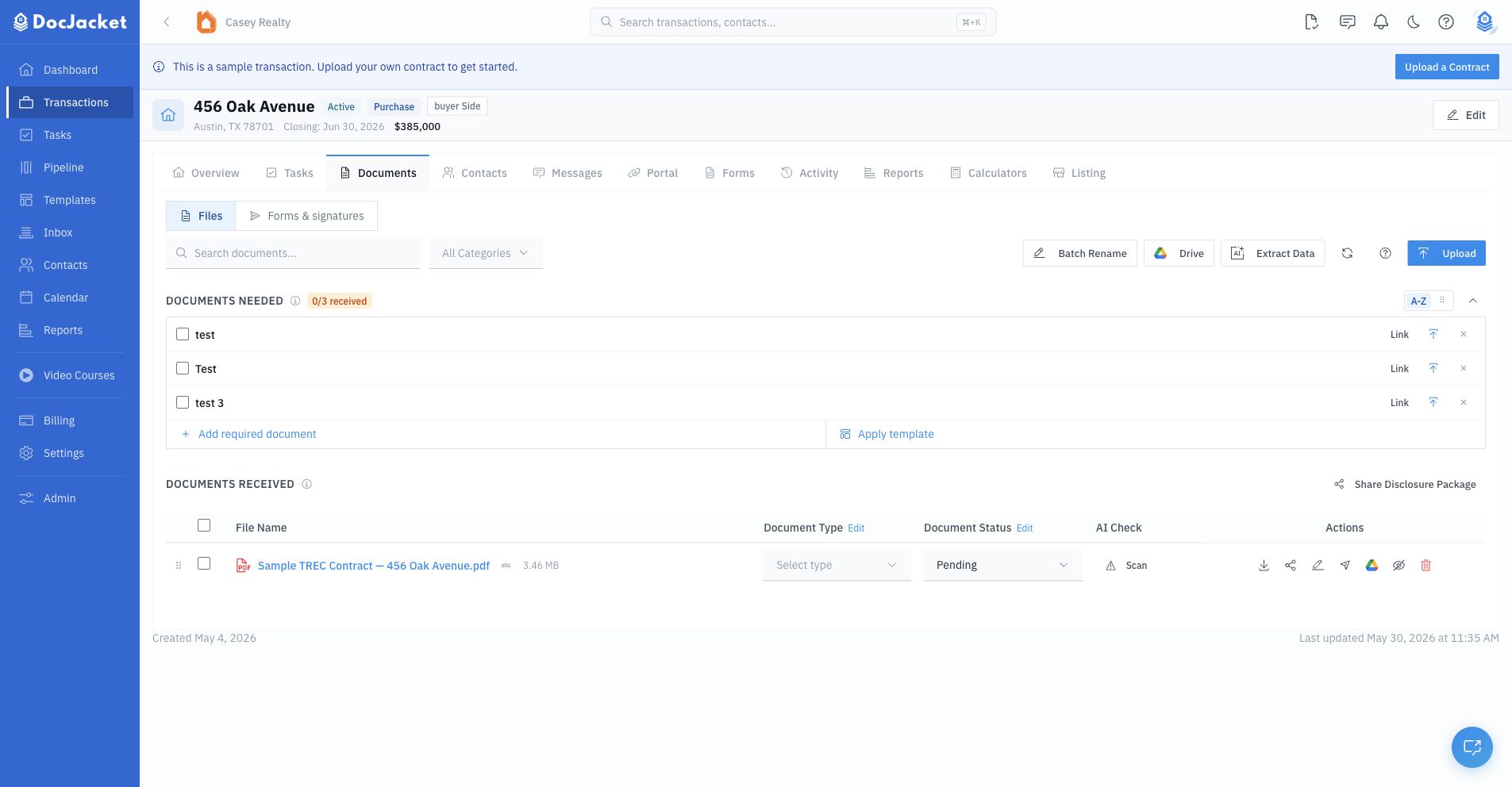
From a transaction's Documents tab, you can:
- Upload files — Choose a category, then upload a PDF, Word file, or image.
- Track completeness — Use Documents Needed to add requirements, apply document templates, link uploads, and track received/overdue/blocking items.
- Review received documents — Search, filter, reorder, rename, batch-rename, change document type/status, download, share, delete, and mark documents as sent.
- Extract data — Use Extract Data to upload documents, run extraction, review changed fields, and update an existing transaction.
- Control portal visibility — Use the eye icon to show or hide documents on the Agent and Client Portals, optionally restrict visibility to selected portal contacts, and decide whether portal viewers can download the file.
- Connect to Google Drive — Import from Drive, export selected/all documents, and link or change the transaction's Drive folder.
- Share disclosure packages — Curate received documents and share them with recipients.
- Send for e-signature — Use the Forms & signatures subtab for office-approved form packets and packet tracking, or send a single uploaded document for signature from its row actions.
The transaction tab has two subtabs: Files for uploaded documents and Forms & signatures for e-sign packet workflows.
In this section
- Uploading Documents — How to get files into DocJacket
- AI Data Extraction — Let AI read your documents
- Documents Needed — Track required documents and link received files
- Portal Visibility — Control which portal viewers can see and download documents
- Signature Requests — Send documents for e-signature and track completion
- E-Signatures — Review all signature requests and signing progress
- Approved Form Templates — Upload blank PDFs, map fields, and publish office-approved forms
- Form Packets — Send approved form packets and track signer progress
- Disclosure Packages — Share disclosure packages from a transaction
- Google Drive Integration — Import, export, and link Drive folders
- DocDrop — Let contacts email documents directly into the transaction