Sending Emails
You can compose, send, schedule, and save emails directly from a transaction without switching to Gmail or Outlook.
New to this? See How Email Sending Works for who each email sends as and where replies go.
Composing an email
Open a transaction, go to Email > Inbox, and click Compose. The composer opens as a full-width New message view inside the transaction.
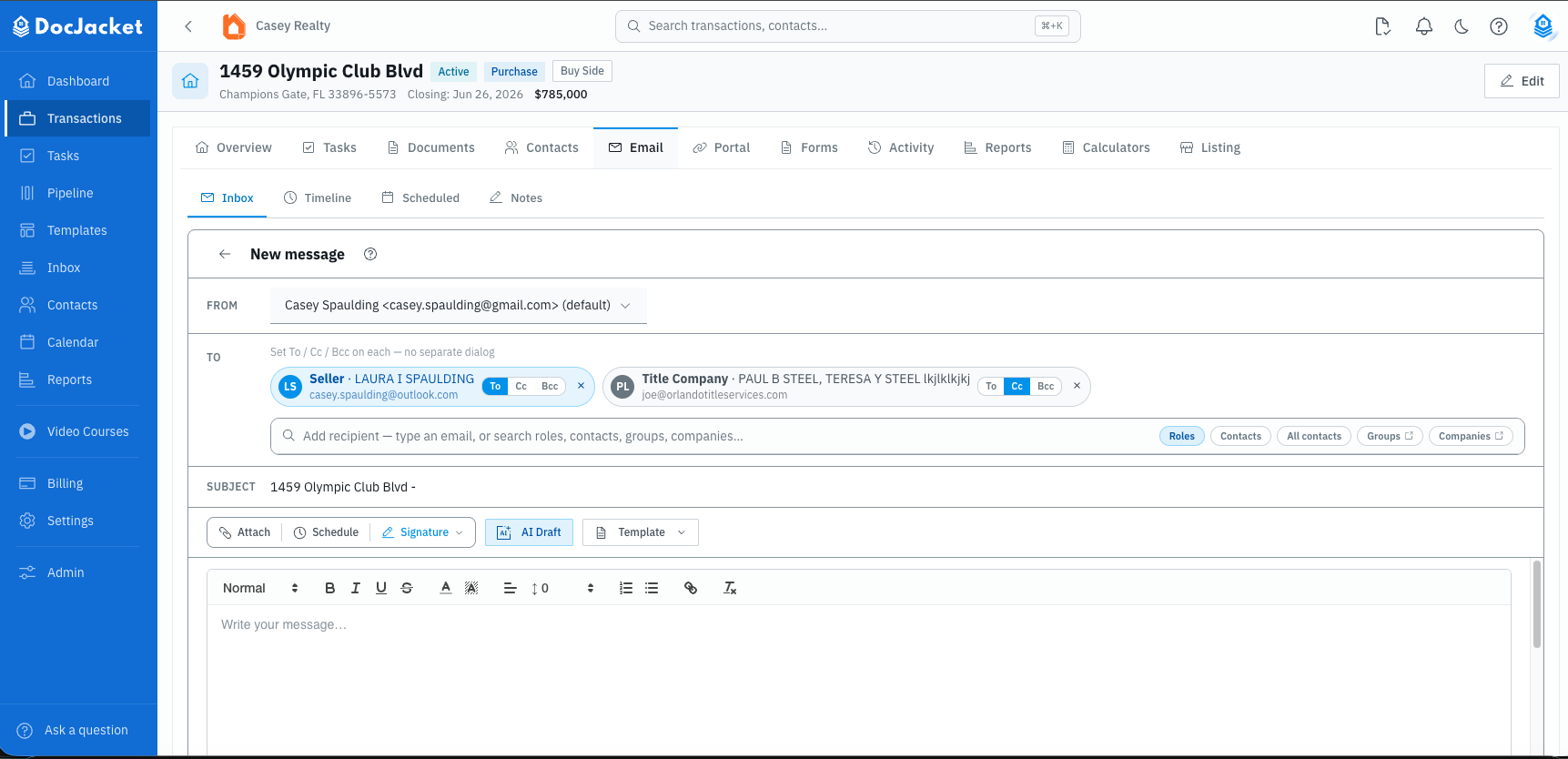
In the composer you can:
- Choose the connected Gmail or Outlook account to send from
- Type an email address or search roles, contacts, all contacts, groups, or companies
- Set To, Cc, or Bcc on each recipient chip
- Insert an email template from the toolbar
- Generate an AI Draft from a short prompt
- Attach transaction documents or upload files from your computer
- Pick an email signature
- Save a draft, send now, or use Schedule to send later
If you navigate away mid-message, DocJacket asks before anything is lost - Save draft & leave keeps the recipients and everything else you entered under Email > Inbox > Drafts until you are ready to finish and send.
The email is stored with the transaction automatically after it sends.
Use AI Draft for a one-off message you need to write quickly. Reach for an email template when it's an email you send on every deal — templates keep the wording consistent and fill in smart fields for you.
Recipients
The recipient row is designed so you do not have to open separate To, Cc, and Bcc dialogs.
Use the search box to add recipients, or filter it with the pills on the right:
- Roles - one row per role on this transaction. A role can hold several people: if the deal has two sellers, the Seller row shows 2 contacts and one click adds both. This is the fast way to get a second buyer or second seller onto an email.
- Contacts - the people already on this transaction, each shown with the exact email address they will receive.
- All contacts - your whole org-wide address book, excluding anyone already on this transaction (deal people live under Contacts instead). Use it to bring in a past contact from an earlier deal.
- Groups and Companies - reusable recipient lists and company records.
- Or type any email address directly.
After adding a recipient, use the chip controls to switch that person between To, Cc, and Bcc, or remove the chip. Each chip shows the role, name, and address, so you can see exactly who gets the email before you send.
A contact won't populate in the To field
If someone has a contact record, their email has been added, and they are attached to the transaction, but they still do not appear when you search:
- Check which pill is selected. All contacts deliberately excludes people already on this transaction - so searching it for someone attached to the deal returns "no contacts match." Switch to Contacts (or Roles) and they will be there.
- Check they are not already a chip. A person already added as a recipient no longer shows in the pick list.
- Check the contact record has an email address. A transaction contact without an email cannot be added as a recipient - open the transaction's Contacts tab, expand the person, and add one.
- Type the address directly. The search box accepts any email address as a fallback.
Template and automated emails resolve recipients by role, so a second buyer or second seller also auto-populates on those sends once they are on the transaction with the right role - see Contact Roles.
Scheduling an email
Use Schedule in the compose toolbar when an email should go out later. The composer keeps the recipients, subject, body, signature, template, and attachments in one place while you set when the email should send.
You can schedule by:
- Relative to a milestone - choose the milestone, offset, send time, and weekend handling
- Absolute date - choose a specific date, time, and timezone
Scheduled one-off emails appear in Email > Scheduled with a One-off badge. You can cancel them there. Editing one opens the composer with the message prefilled; saving cancels the original scheduled send and creates a new one.
Attachments
Use Attach to choose files already stored on the transaction or upload new files from your computer. Local uploads support files up to 25 MB.
If you attach transaction documents, DocJacket sends the selected files with the message and keeps the email linked to the transaction.
Reviewing messages
The Inbox tab includes filters for Inbox, Unread, Sent, Drafts, Auto, and Archived. Open a message to reply, reply all, forward, star, mark read or unread, archive, or delete it.
Messages can show delivery status and provider message IDs when DocJacket has them. If a message includes suggested AI actions, approve or dismiss them from the message detail panel.
Searching
Use the search bar to find emails by subject, recipient, or content across all messages in the transaction.