Restoring or Deleting an Archived Transaction
An archived deal isn't stuck there. You can pull it back into your active list at any time, or — if you're certain — remove it for good.
Viewing your archived deals
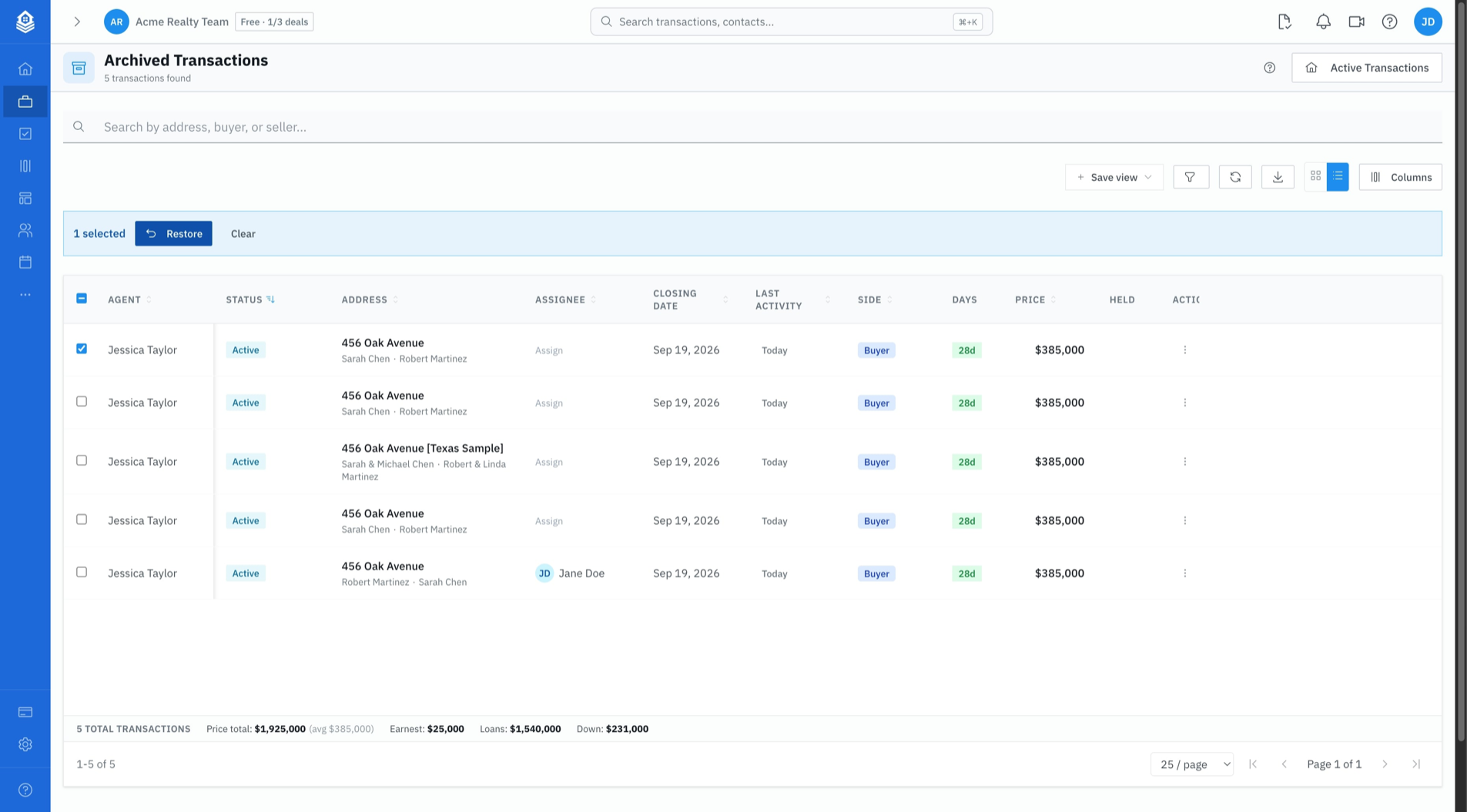
On the Transactions page, click Archived in the top right. The count badge tells you how many are waiting. The list works like the normal one: search, sort, and columns all behave the same. Click Active Transactions to go back.
Restoring a deal
To unarchive a deal (bring it back from the archive), use any of these:
- Tick one or more rows and click Restore in the bulk-action bar, or
- Use the row's ⋮ menu and choose Restore, or
- Open the archived deal — it still opens, with an amber banner reading "This transaction is archived" and the date — and click Restore transaction in the banner
An archived deal is not locked: you can open it and read every tab without restoring it. Restore only when you want it back in your active list.
What restoring brings back
- The deal returns to your active Transactions list and your active-deal counts
- Documents and text-message threads are un-archived
- Client portal links are reactivated — the link you sent works again
- Tasks reappear in your task list and on your calendar
- Review queue proposals that archiving expired are put back to pending
What restoring does not bring back
This is the part worth knowing before you archive something you're unsure about.
- Task statuses stay where archiving left them. Tasks that were open became Skipped, and they stay Skipped — they're visible again, but not open again.
- Key dates stay Not Applicable. Dates that were pending were marked N/A, and restoring does not make them pending again.
- Deleted scheduled emails are gone. Pending scheduled email is deleted at archive time and cannot be recovered — you'd reschedule it.
This is deliberate: restoring shouldn't silently reopen work someone decided was finished. After restoring a deal you intend to keep working, walk its tasks and key dates and reactivate what should be live.
If you're restoring a deal only to look something up — far and away the most common reason — none of this matters. It matters when you're putting a deal back into active service.
Deleting a transaction permanently
Deletion is a separate, heavier action, and it lives away from the list on purpose:
- Open the transaction and click Edit
- In the footer, click Delete Transaction
- Confirm with Delete Permanently
The confirmation spells out what you're agreeing to: the transaction is permanently deleted, its milestones, tasks, scheduled messages, and portal links are cancelled, and it stops appearing in every list — including the Archived view. It cannot be undone from the app.
There is no undelete. If there is any chance you'll want the record — for a commission dispute, an audit, a broker file review, or just to remember what happened — archive it instead. Archiving costs you nothing: archived deals don't count against your active deals and don't appear in your working list.
When DocJacket refuses to delete a deal
If your office has compliance archival enabled, closing a transaction writes an immutable, retention-protected copy of it. A deal under that protection cannot be deleted — the delete will not go through, by design, because the record is being held for a retention period your brokerage set.
That's the system working as intended rather than an error. See Security & Privacy for how retention and immutable storage work, and talk to whoever administers your office if a record genuinely needs to go.
Related
- Archiving a Transaction — what archiving winds down, and archive vs. cancel vs. delete
- Cancelling or Closing a Transaction — ending a deal with a terminal status