Transaction Overview
The Overview tab is where most TCs spend their time. It shows everything important about a deal on one page — no clicking through multiple tabs to find what you need.
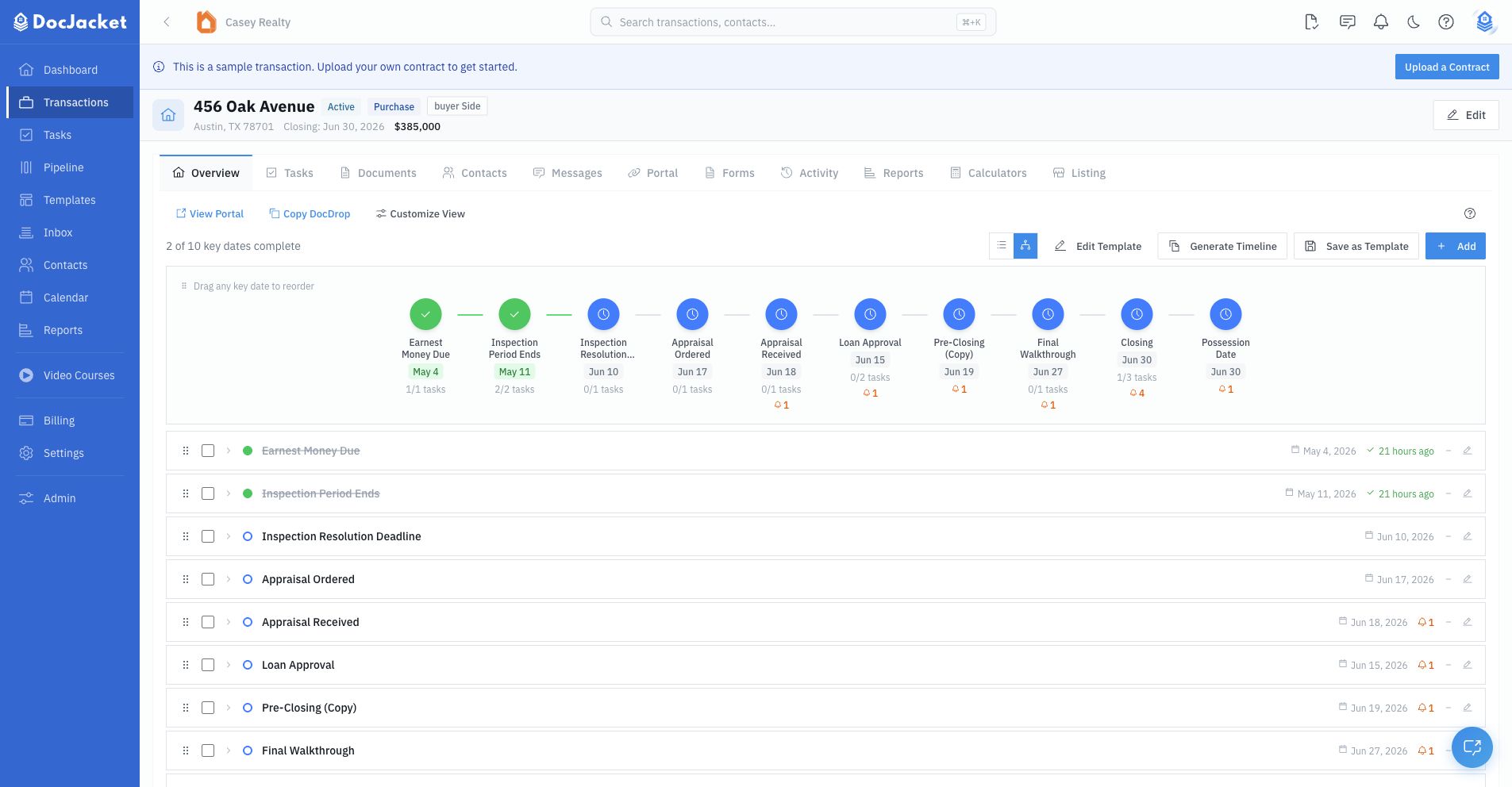
What's on the Overview
The Overview is customizable, so your organization may hide, pin, or collapse some sections. Common sections include:
Closing Timeline
The closing timeline appears near the top of the Overview when the section is visible. It shows transaction key dates, status, missing-date warnings, linked task progress, reminders, and the Playbook template that created the timeline when one has been applied.
Use Generate Timeline to calculate key dates and linked tasks from one Playbook template. The confirmation step shows the transaction anchor dates, key-date count, task count, owner assignments, phases, and the replacement option before anything is created.
The timeline has two views:
- Vertical checklist view — A list of key dates with status, phase, governed Key Date Type, linked tasks, reminders, and drag handles for visual order.
- Pipeline view — A horizontal visual timeline for scanning complete, upcoming, overdue, needs-date, and not-applicable items.
Use Add to add a one-off key date. Use Edit Template when the transaction timeline came from a Playbook and you want to change the reusable template. Use Save as Template to turn the transaction's current key dates and tasks into a reusable Playbook.
Risk Insights
When a transaction has a stored risk assessment, a risk chip appears in the transaction header. Click it to review the summary, risk factors, mitigations, recommendations, and to re-run the assessment.
Waiting On
The headline blocker for the deal. Use it to show what the transaction is currently waiting on, such as client action, signatures, title, lender, inspection, or closing.
Financial Summary
Purchase price, earnest money, loan amount, and other financial terms at a glance. Quick reference so you don't have to dig through the contract.
Additional Details
Deal details that do not fit into the main summary cards, such as listing, occupancy, financing, and other transaction fields your organization tracks.
Tasks
Your to-do list for this transaction. Add tasks, check them off, and track what's overdue. The progress bar shows how much is complete.
Notes
Internal notes for your team. These are private — they're not visible to clients or agents on the portal.
Property Images
Upload photos of the property. Star an image to feature it on reports and the client portal.
Documents
Contracts, disclosures, and other files for this transaction. Track approval status and upload new documents right from here.
Calendar Sync
If your account has Google Calendar connected, this card controls whether this transaction participates in Google Calendar sync. Turn it off when you want to hide this transaction's dates from Google without disconnecting Google Calendar for the whole account.
Calendar settings still control whether task due dates sync. When task syncing is off, closing dates and key dates can still sync for transactions where calendar sync is enabled.
Contingencies
Track configured contingency status throughout the deal. Mark each as Active, Satisfied, Waived, or Not Applicable as the transaction progresses.
Repairs
Track common repair categories and their resolution status. Mark items as N/A, Pending, or Resolved, and add notes when needed.
Messages
Recent emails related to this transaction. See unread counts and click through to the full message thread.
Parties and Contacts
The people involved in the deal. The overview can show buyers, sellers, agents, title company, lender, vendors, and additional contacts, with links into the full Contacts tab.
Utility Providers
Who to call for utilities at the property. See Tracking utility providers below.
System Credentials
Store login details for MLS, tax portals, and other external systems used in this transaction. Keeps everything in one place so you're not hunting through emails for passwords.
Tracking utility providers
Keep the property's utility providers on the deal so you know who to call for utilities — electric, gas, water, sewer, trash, and internet — without digging through emails.
- Open the transaction and go to the Overview tab
- Find the Utility Providers card in the right-hand column. It starts collapsed — click the card header to expand it
- Click Add utility provider
- Choose the Type: Electric, Gas, Water, Sewer, Trash, Internet, or Other
- Enter the Provider name, Phone, and Account #. You need at least one of these three
- Click Save
Each provider shows as a row in the card with its type, provider name, phone number, and account number. Use the edit icon to change a row, or the remove icon to take it off the deal.
The Utilities Information section of a SitRep report shows these utility providers. If the card is empty, that section is left out of the report. See SitRep Templates.
The Overview is customizable. If the Utility Providers card is missing, open Customize View on the Overview and turn it back on.