Key Date Library
The Key Date Library stores individual reusable date rules. These are the building blocks that Playbook templates use to create a transaction timeline.
Examples:
- Final Walkthrough Date = Closing Date - 1 business day
- Possession Date = Closing Date + 1 business day
- Inspection Deadline = Effective Date + 10 calendar days
A key date template is the date-logic layer. A Playbook is the workflow layer that consumes those dates and attaches tasks, due-date offsets, and email automation.
Key Date Library page
Go to Templates > Key Date Library to manage reusable key date definitions.
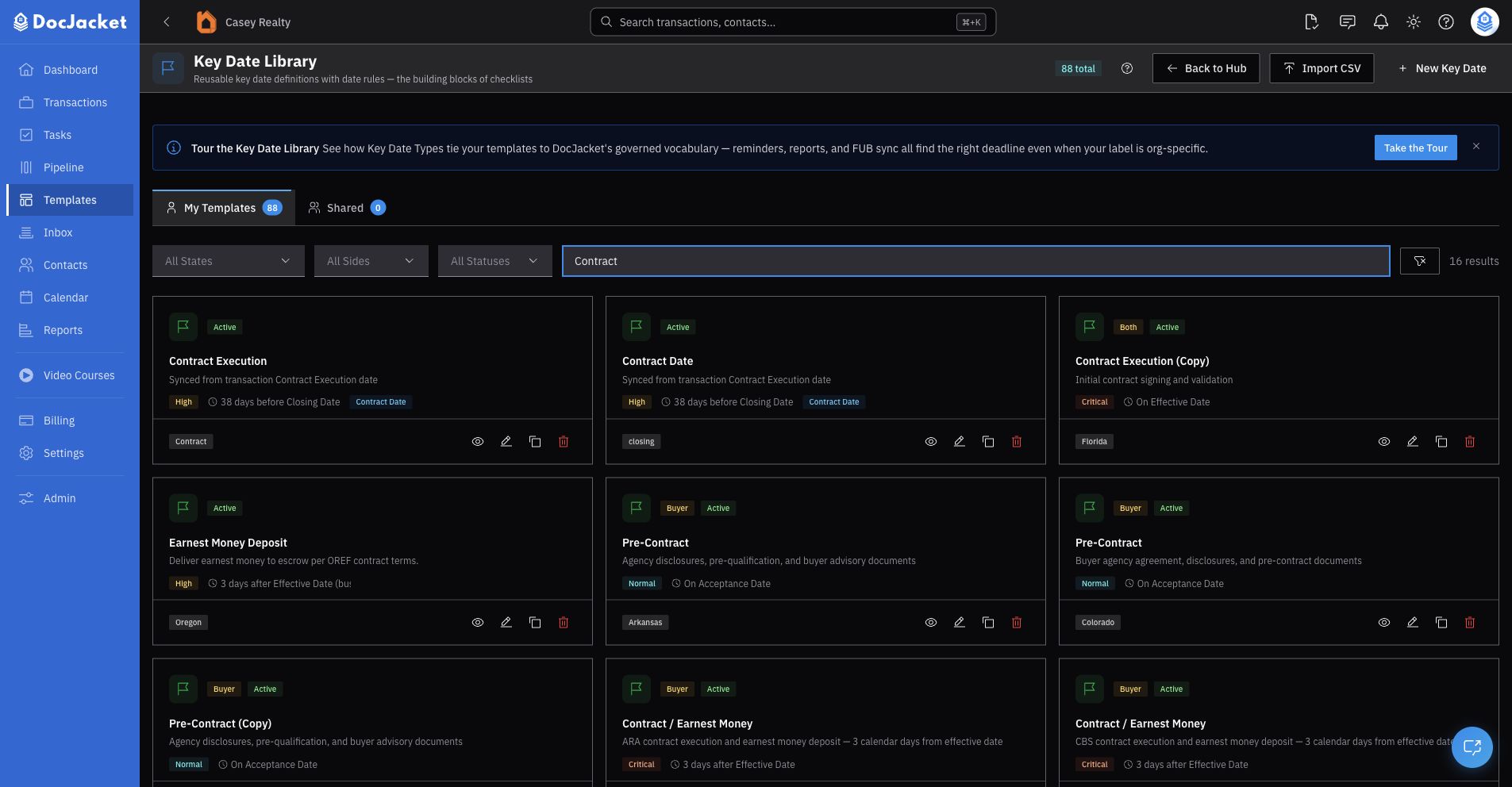
The page has two tabs:
- My Key Dates — key dates your organization owns and can edit
- DocJacket Key Dates — ready-made key dates DocJacket provides, available to every organization
DocJacket key dates are read-only. Use Copy to My Key Dates, Duplicate, or Duplicate as Custom to create an editable organization-owned version. Your copy shows a Copied from line naming the key date it started from.
Use the filters to narrow the list by:
- State
- Side
- Status — Active or Inactive
- Search — key date name or description
On My Key Dates, use Import CSV when you need to add multiple key dates at once.
Creating a key date rule
- Go to Templates > Key Date Library
- Click New Key Date
- Enter a name, such as "Final Walkthrough Date"
- Choose a Key Date Type when the date maps to a governed DocJacket concept
- Choose the state and side if applicable
- Set the priority and display order
- Set the date calculation rule
- Save the key date
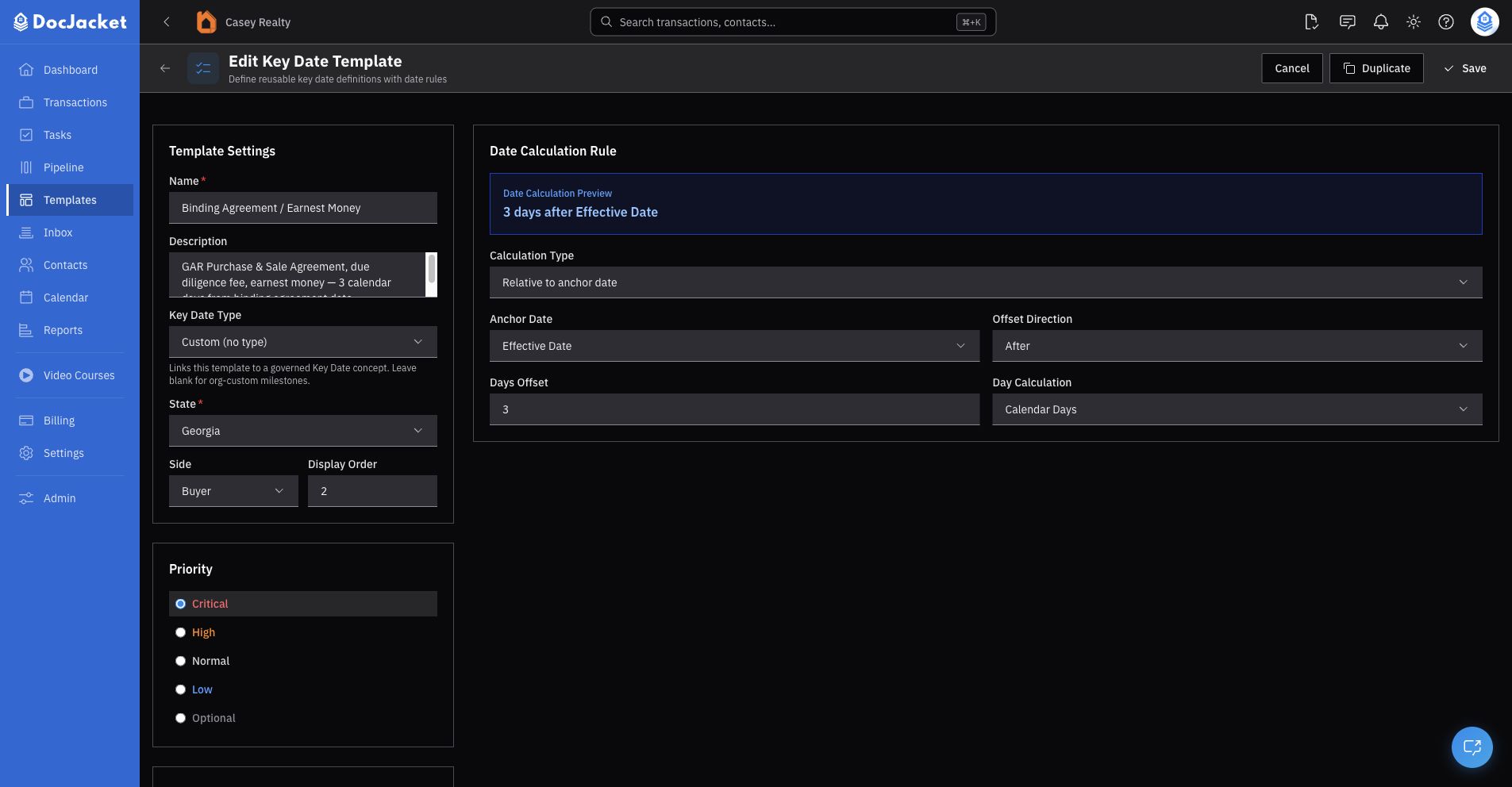
The editor title may say New Key Date Template or Edit Key Date Template. The Templates hub and list page label this area Key Date Library.
Template settings
A key date template includes:
- Name
- Description
- Key Date Type
- State
- Side
- Display Order
- Priority
- Active or Inactive status
DocJacket key dates are read-only. Duplicate one before editing it.
Date calculation rules
A key date can use one of three calculation types:
- Relative to anchor date — Calculates from another date, such as Closing Date or Effective Date.
- Fixed day number — Uses a fixed day number.
- Manual entry — Creates a key date that users fill in manually on the transaction.
For relative rules, configure:
- Anchor Date — The date this key date depends on, such as Closing Date.
- Offset Direction — Before or after the anchor.
- Days Offset — How many days from the anchor.
- Day Calculation — Calendar days or business days.
The editor shows a live date-rule preview, such as:
1 day before Closing Date (business)
Governed Key Date Types
Use Key Date Type when the date maps to a standard DocJacket concept such as Closing Date, Effective Date, Inspection Deadline, Financing Deadline, Final Walkthrough, or Possession Date.
Governed types help DocJacket connect the same concept across:
- Playbooks
- Transactions
- Calendar visibility
- Reports
- Smart fields
- Integrations
The name can still match your team's language. If the name looks like a known key date type, DocJacket can suggest the governed type for you.
Leave Key Date Type blank for organization-specific dates that do not map to a standard concept.
A governed Key Date Type is what connects the same date across Playbooks, the calendar, reports, smart fields, and integrations. The name can still match your team's language — the type is what makes automation reliable. Only leave it blank for truly organization-specific dates.
State, side, priority, and status
Use state and side when a rule only applies to a particular workflow. For example:
- Florida buyer side
- Texas seller side
- Both sides
Priority controls how important the key date appears in lists and reports.
Inactive key dates stay in the library but are hidden from normal template selection. Use inactive status for old rules you do not want users to add anymore.
CSV import
Use Import CSV from My Key Dates when you need to add multiple key dates at once.
After importing, review each key date for:
- Correct name
- Correct governed type
- Correct anchor date
- Correct offset and day calculation
- Correct state and side
Deleting key dates
DocJacket prevents deleting a key date while it is still referenced. If delete is blocked, the dialog lists what still points to it, such as:
- Transaction key dates created from this template
- Other key date templates that depend on this one
- Reminder rules that still point to this template
Update or remove those references first, then delete the key date.
How Playbooks use key dates
Playbook templates consume key dates. Tasks should reference the key date they depend on instead of recreating the same date logic.
Good:
- Task due = Final Walkthrough Date - 3 days
Avoid:
- Task due = Closing Date - 4 days because that happens to equal the walkthrough date
Keeping the date rule in the Key Date Library prevents drift when the rule changes later.
Custom key dates
Leave Key Date Type blank for organization-specific dates that do not map to a standard DocJacket concept. Custom key dates can still be used in Playbooks and transactions, but governed types make automation, reporting, calendar sync, and smart fields more reliable.
Tips
- Use governed Key Date Types whenever the date maps to a standard transaction concept.
- Use custom key dates for internal or state-specific events that DocJacket should not treat as a standard concept.
- Prefer business-day rules when the contract language says business days.
- Keep the key date rule here and let Playbook tasks reference it.
- Duplicate shared key dates instead of editing around them in a Playbook.