Email Templates
Create reusable email templates with smart fields that auto-populate with transaction data. Write your common emails once, organize them by transaction stage and audience, and reuse them from messages, tasks, and automations.
Email templates can include subject lines, rich email bodies, smart fields, recipient rules, and document categories to auto-attach when the email sends.
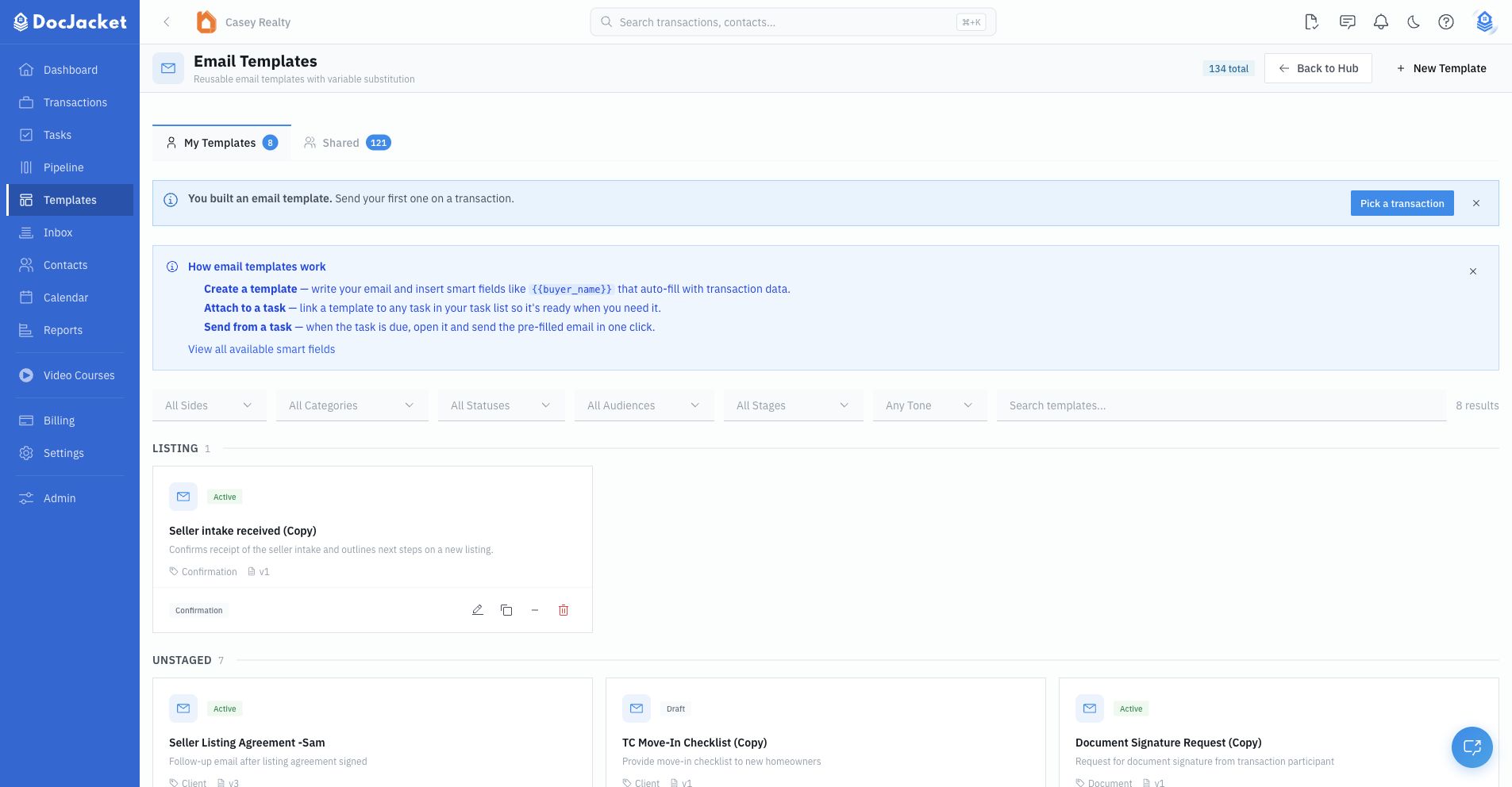
My Email Templates and DocJacket Email Templates
The Email Templates page has two tabs:
- My Email Templates - Templates your organization owns and can edit
- DocJacket Email Templates - Ready-made templates DocJacket provides, which you can copy into your organization
DocJacket templates are read-only. Use Copy to My Email Templates before changing the subject, body, attachments, recipients, or smart fields. Your copy shows a Copied from line naming the template it started from.
The list groups templates by stage and shows each template's active/draft status, category, version, and smart-field count. Use the filters for side, category, status, audience, stage, tone, and search when your library grows.
Creating an email template
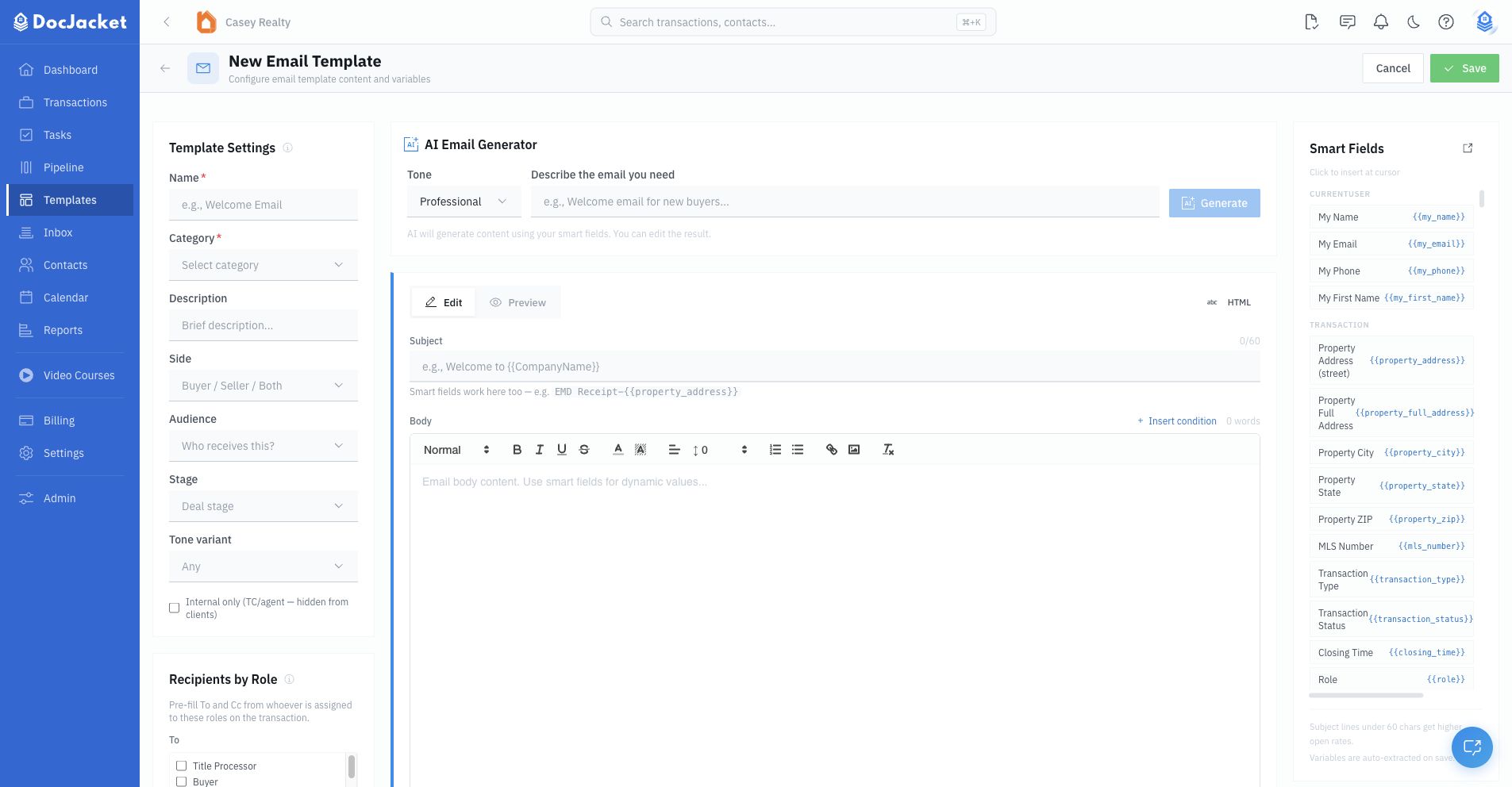
- Go to Templates > Email Templates in the sidebar
- Click New Template
- Enter the template name and category
- Choose the side, audience, stage, and tone if helpful
- Choose whether the template is internal only
- Set default recipient roles or recipient rules
- Write the subject line
- Write the email body with formatting and smart fields
- Select document categories to auto-attach if needed
- Preview or send a test email
- Save the template
Templates can be Active or Draft. Keep a template in draft while you are testing it, then activate it when it is ready for your team.
The builder is split into three working areas:
- Template Settings and recipients - Name, category, side, audience, stage, tone, internal-only status, recipients by role, and conditional recipient rules.
- Content editor - AI Email Generator, subject, rich body editor, HTML mode, conditional snippets, and the Edit/Preview tabs.
- Smart fields and attachments - Quick smart-field buttons, the full smart-field picker, and auto-attach document categories.
Organizing templates
Use the filters on the Email Templates page to find the right template quickly:
- Side: Buyer Side, Seller Side, or Both
- Category
- Active or Draft status
- Audience
- Stage
- Tone
- Search by name or description
Templates are grouped by stage, such as listing, under contract, inspection, appraisal, financing, pre-closing, closing, and post-closing.
Smart fields
Smart fields are placeholders that get replaced with real transaction data. They use double-brace syntax:
{{buyer_name}}{{seller_name}}{{property_address}}{{closing_date}}{{purchase_price}}{{agent_name}}{{brokerage_name}}
Smart fields work in the subject and body. For example:
EMD Receipt - {{property_address}}
Use the smart-field side panel or picker to insert fields at the cursor. See Smart Fields for the full field library and conditional syntax.
Recipient targeting
Email templates can pre-fill recipients from contacts assigned to roles on the transaction.
Use Recipients by Role for common cases:
- To: Buyer
- Cc: Agent
- Cc: Transaction Coordinator
Use Recipient rules when recipients need conditions. A rule can target To, Cc, or Bcc, use a merge-field source or quoted email address, and optionally include a condition such as role == "Dual".
Leave recipient rules blank if the role checkboxes are enough.
The Audience field is for search and filtering — it helps you find templates on this page. It has no effect on who receives the email. Set actual recipients with Recipients by Role or Recipient rules above.
How this works with task emails
When a template is attached to a task, the recipients you set here act as the fallback: the task's own recipients win if it has any, and otherwise the email uses this template's Recipients by Role.
That means setting recipients once here covers every task using the template — you only need to set recipients on an individual task when that one task should reach someone different. See Email Automation.
Auto-attach documents
Use Auto-Attach Documents when a template should always include files from specific document categories.
For example:
- A disclosure email can auto-attach disclosure documents
- An inspection email can auto-attach inspection documents
- A closing package email can auto-attach closing documents
DocJacket attaches matching documents from the transaction when the email is sent.
Preview and testing
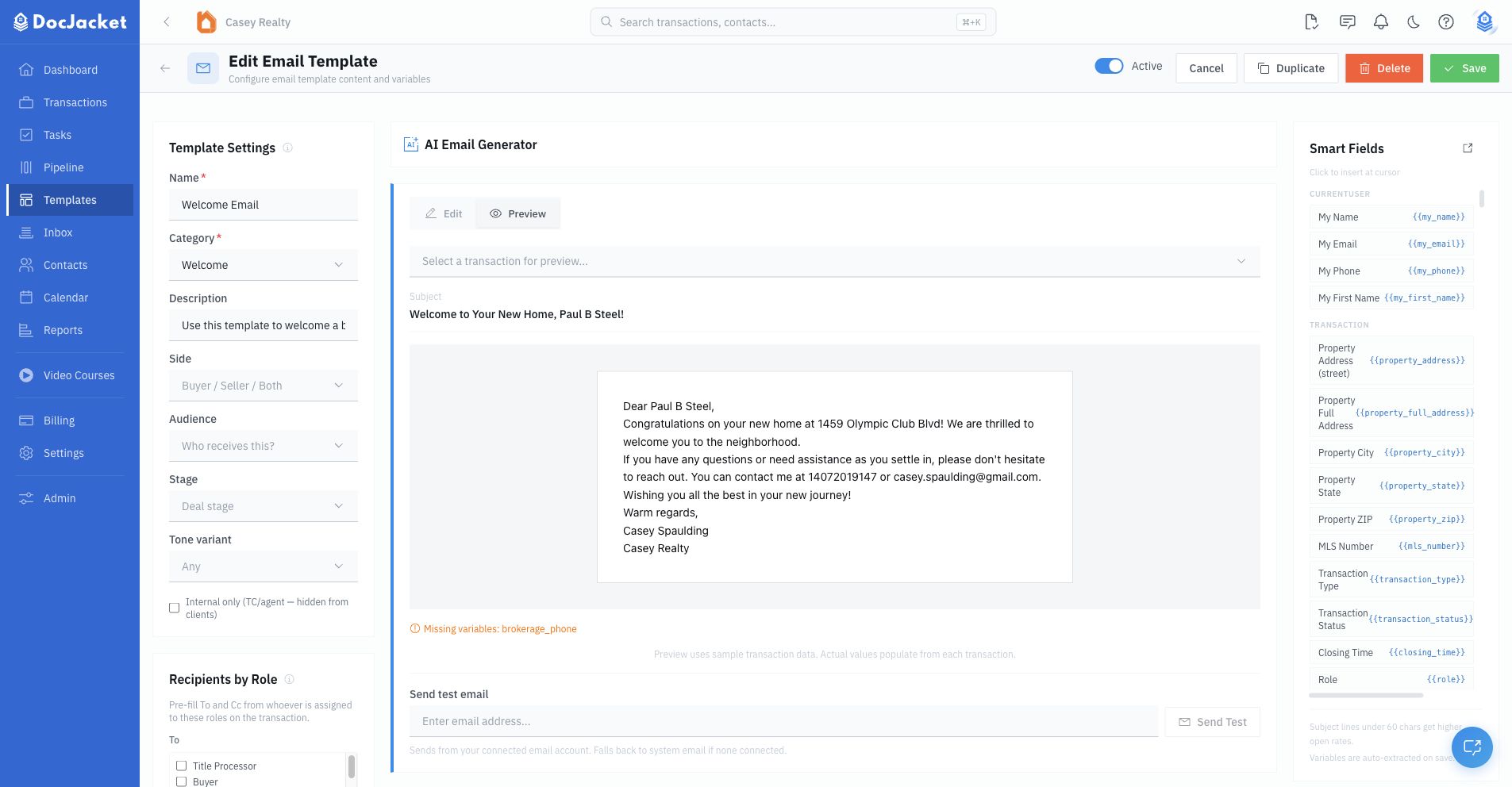
Use the Preview tab to render the template before sending. You can preview with sample data or select a transaction for a more realistic preview.
If the template uses conditional content, the preview tools let you test sample values such as buyer/seller side, earnest-money location, or whether an assistant is on the transaction.
Use Send Test to send a test email before activating a new or heavily edited template.
Keep a template in Draft while you build it, and send yourself a test send once conditions or auto-attached documents are involved. A template linked to a task sends on its own when the task comes due — so it's worth confirming it renders correctly before it goes out unattended.
If a smart field is valid but the transaction does not have the data yet, the preview can show a missing-variable warning. If a field name is not recognized, fix the placeholder in the template.
AI email generator
When creating or editing an organization-owned template, you can use the AI email generator to draft a starting point. Enter the email you need, choose a tone, generate a result, then apply it to the form and edit before saving.
Common templates to create
Here are some templates most TCs find useful:
- Welcome email — Introduction to the transaction process for new clients
- Title company introduction — Connect the title company with all parties
- Inspection scheduling — Coordinate inspection appointments
- Status update — Weekly or key-date-based progress update
- Closing reminder — Sent a few days before closing with final instructions
- Post-closing thank you — A nice touch after the deal closes
Using templates with tasks
Email templates become even more powerful when linked to tasks. Set up a task like "Send closing reminder" with a linked template, and the email is ready to go when the task comes due.
Task-linked templates can render smart fields, show unresolved-field warnings, include the default email signature, and send with attached documents when configured.
To use a template while composing in a transaction, click the Template button in the compose toolbar, choose the saved template, and review the filled subject, body, recipients, attachments, and missing-field warnings before sending.
Tips
- Keep subject lines short and specific.
- Use Draft status while testing smart fields, conditions, and attachments.
- Copy shared templates before customizing them.
- Use recipient roles for normal routing and recipient rules for conditional routing.
- Send yourself a test email after changing conditions or auto-attached document categories.